

Introduction: The New Digital Paradigm
The digital landscape is undergoing its most profound shift since the advent of the smartphone. We are moving beyond static tools and simple query-response search engines into an era of proactive, conversational, and intelligent digital agents. At the forefront of this revolution are two distinct but increasingly converging categories: AI Assistants and AI Browsers.
AI Assistants—like OpenAI’s ChatGPT, Google’s Gemini, and Anthropic’s Claude—are sophisticated conversational agents built on Large Language Models (LLMs). They excel at understanding, generating, and reasoning with text, acting as powerful collaborators for content creation, coding, analysis, and learning.
AI Browsers, on the other hand, are reimagining the foundational tool of the internet: the web browser. Platforms like The Browser Company’s Arc Search, Brave with Leo, and AI-enhanced versions of Chrome and Edge integrate AI directly into the browsing experience. They don’t just fetch pages; they summarize, research, and interact with web content on your behalf.
This 3000-word analytical article will delve into the core of these technologies, provide a detailed competitive analysis of key players, and weigh their respective pros and cons. We will explore how they are changing the way we work, learn, and access information.

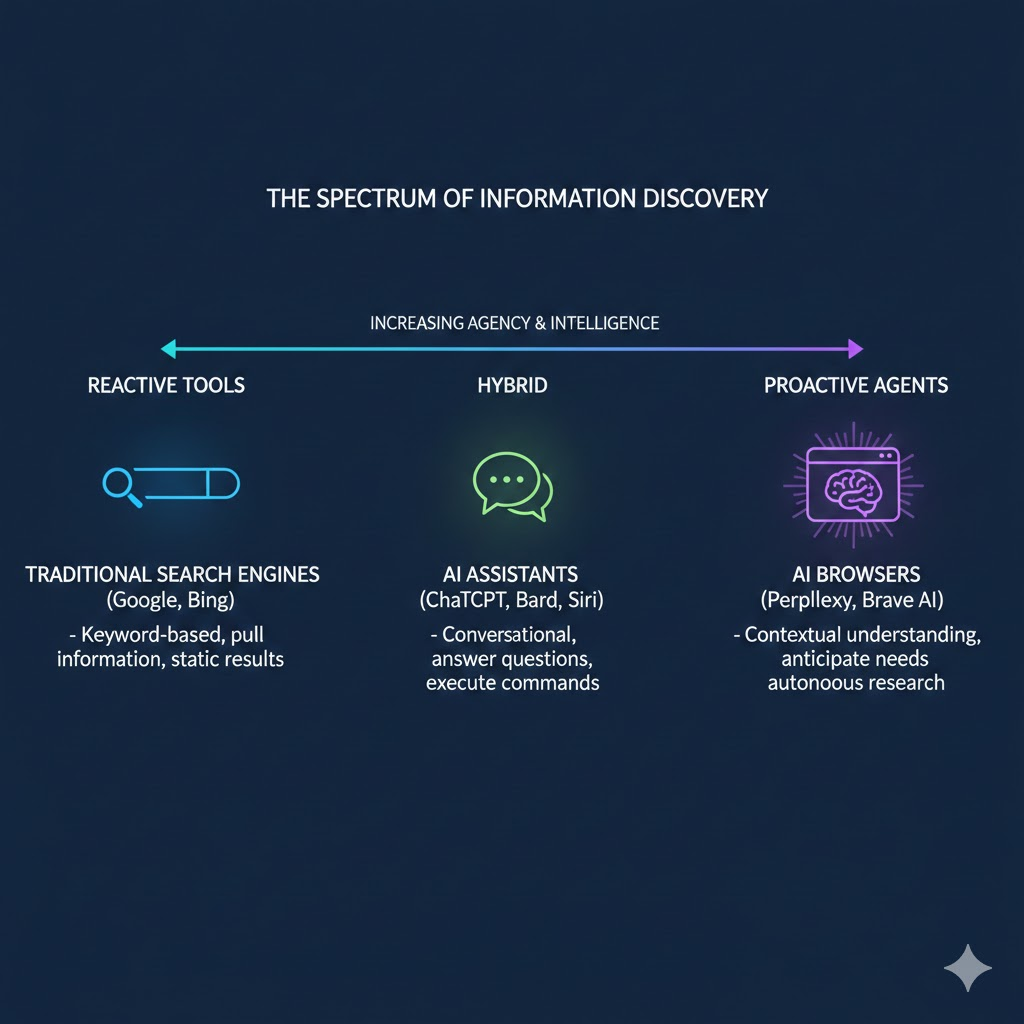
Infographic 1: The spectrum showing traditional search engines, AI assistants, and AI browsers on a scale from reactive tools to proactive agents.
Part 1: AI Assistants – The Power of Conversation
What is an AI Assistant?
An AI Assistant is a software agent that uses Natural Language Processing (NLP) and machine learning to understand and respond to user requests in a conversational manner. Modern assistants are powered by LLMs trained on vast datasets, enabling them to perform a stunning array of tasks: writing emails, debugging code, drafting legal documents, creating marketing plans, and tutoring complex subjects.
Competitive Analysis: The Major Players
The AI Assistant market is highly competitive, with tech giants and nimble startups vying for dominance.
1. OpenAI’s ChatGPT
- Core Strengths: The pioneer that brought LLMs to the mainstream. It boasts the largest user base, a vast plugin ecosystem (GPTs), and multimodal capabilities (vision, voice, file uploads) in its paid tiers. Its GPT-4 model is renowned for its reasoning and coding prowess.
- Target Audience: General consumers, developers, writers, and businesses via its API.
- Business Model: Freemium (free GPT-3.5 tier, paid ChatGPT Plus/Team/Enterprise).
2. Google Gemini (formerly Bard)
- Core Strengths: Deep integration with Google’s ecosystem (Workspace, Search, YouTube). It excels at providing fresh information via real-time Google Search integration and handling tasks like email drafting in Gmail or document analysis in Drive.
- Target Audience: Users deeply embedded in the Google ecosystem.
- Business Model: Freemium, with advanced features tied to Google One subscription.
3. Anthropic’s Claude
- Core Strengths: A strong focus on safety, constitutional AI, and “steerability.” Claude excels at long-context handling (up to 200K tokens), making it ideal for analyzing lengthy documents, legal contracts, or entire codebases. It is perceived as less prone to harmful outputs.
- Target Audience: Enterprises, researchers, and users needing deep document interaction.
- Business Model: Freemium with daily limits, paid Pro tier for heavy usage.
4. Microsoft Copilot
- Core Strengths: Deeply embedded across the Microsoft 365 suite (Word, Excel, PowerPoint, Outlook). It functions as a true workplace co-pilot, able to create presentations from prompts, analyze Excel data, and summarize Teams meetings. Its integration with Windows 11 makes it a system-level AI Assistant.
- Target Audience: Enterprise and professional users of Microsoft products.
- Business Model: Included with Microsoft 365 business/enterprise subscriptions.
Pros and Cons of AI Assistants
Pros:
- Versatility: A single tool can perform hundreds of tasks, from creative writing to technical analysis.
- Depth of Knowledge: Trained on extensive corpora, they possess broad, cross-domain knowledge.
- Complex Reasoning: Capable of multi-step logic, comparative analysis, and nuanced problem-solving.
- Creativity & Ideation: Powerful brainstorming partners for generating ideas, marketing copy, or code structures.
- 24/7 Availability: Instantaneous, tireless assistance.
Cons:
- Hallucinations: Tendency to generate plausible-sounding but incorrect or fabricated information.
- Lack of Real-Time Awareness (in base models): Most require plugins or web search activation for current information, risking outdated responses.
- Context Window Limits: Even with large windows, they can “forget” parts of very long conversations or documents.
- Privacy Concerns: User prompts are often used for model training unless explicitly opted out (varies by provider).
- Computational Cost: Advanced models require significant processing, leading to usage limits or subscription fees.
A concise, structured comparison table covering ChatGPT, Gemini, Claude, and GitHub Copilot across key product dimensions such as developer, best-fit use case, pricing model, core strengths, and notable limitations:
| Metric | ChatGPT | Google Gemini | Anthropic Claude | GitHub Copilot |
|---|---|---|---|---|
| Developer | OpenAI | Google (DeepMind/AI) | Anthropic | GitHub (Microsoft/OpenAI) (Wikipedia) |
| Best For | General AI assistant workflows: content generation, problem solving, brainstorming, research, multimodal queries (Wikipedia) | Multimodal AI, large-context reasoning, integration with Google ecosystem (Workspace, Cloud) (Medium) | Thoughtful analysis, long or complex prompts, nuanced writing & deep reasoning workflows (Aloa) | IDE-centric AI code assistance and developer productivity (auto-complete, refactor, inline suggestions) (GitHub Docs) |
| Pricing Model | Free tier with limits; ChatGPT Plus ~$20/month; Pro ~$200/month; Team/Enterprise custom (Aloa) | Free tier with usage limits; Gemini Advanced ~$19.99/month (often bundled with Google One AI Premium); API usage-based (Aloa) | Free tier; Claude Pro ~$20/month; higher tiers (Max ~$100–200/month); API custom (Aloa) | Copilot Free limited suggestions; Pro ~$10/month; Pro+ ~$39/month; Business/Enterprise options ~$19–39/user/month (GitHub Docs) |
| Key Strength | Versatile across domains (writing, reasoning, chat, multimodal input/output); large ecosystem with plugins and browser tools (Wikipedia) | Extremely large context windows, strong multimodal capabilities, tight Google integration (Search, Gmail, Drive) (Medium) | Handles large documents and reasoning tasks with nuanced outputs and high safety/ethical guardrails (Aloa) | Deep integration into code editors and workflows; strong real-time code completion & developer productivity gains (GitHub Docs) |
| Key Limitation | May generate verbose or repetitive outputs; free tier ads and limits; knowledge cutoff without external browsing unless extended (The Verge) | Coding support and creative reasoning can be less optimized vs specialist tools; restrictions on some advanced features behind subscription (vizzwebsolutions.com) | Lower native IDE integration; can be overly cautious at times; API costs can rise with higher usage (Aloa) | Specialized for code — not designed as a general assistant; security/legal considerations of autogenerated code; requires experienced oversight (GitHub Docs) |
Notes & Clarifications
- ChatGPT: Positioned as a broad AI assistant with multimodal input/output and strong creative reasoning, suitable for a wide range of general tasks beyond code. (Wikipedia)
- Gemini: Google’s flagship AI that emphasizes large context reasoning and integration with its ecosystem, pulling strengths from multimodal models and Workspace synergy. (Medium)
- Claude: Focused on safety, deep analysis, and long-form tasks; Anthropic emphasizes an ad-free approach and thoughtful outputs. (Aloa)
- GitHub Copilot: Tailored to developers as an “AI pair programmer”; excels inside IDEs with contextual code suggestions and task automation but does not replace a general assistant. (GitHub Docs)
Part 2: AI Browsers – The Web, Reimagined
What is an AI Browser?
An AI Browser is a web browser that has Artificial Intelligence capabilities woven into its core functionality. It goes beyond being a passive window to the web. Instead, it uses AI to:
- Summarize articles and web pages.
- Answer questions by synthesizing information from multiple live sources.
- Automate tasks like filling forms or extracting data.
- Enhance privacy via AI-powered ad/tracker blocking.
- Reorganize the user interface contextually.
Competitive Analysis: The New Contenders
This space is newer but evolving rapidly, with both dedicated browsers and AI features in established players.
1. Arc Search (“Browse for Me”)
- Core Strengths: Its flagship “Browse for Me” feature is a paradigm shift. Instead of showing 10 blue links, it reads the top 6-7 pages for your query, synthesizes the information, and creates a neat, customized summary with sources cited. It represents a move from “search” to “answer.”
- Target Audience: Students, researchers, and professionals seeking quick, distilled insights.
- Business Model: Currently free; future monetization likely via premium features.
2. Brave with Leo
- Core Strengths: Built on Brave’s robust privacy foundation (blocking trackers/ads by default). Leo is its native, privacy-focused AI Assistant. It offers anonymous access to LLMs (Mixtral, Claude Instant) without requiring an account, ensuring queries are not stored or used for training.
- Target Audience: Privacy-conscious users who want AI help without data harvesting.
- Business Model: Freemium; premium tier for access to more advanced models like Claude Sonnet.
3. Perplexity AI
- Core Strengths: While accessible via web/API, Perplexity functions most naturally as an AI Browser. It combines the conversational ability of an AI Assistant with real-time web search, citation of sources, and the ability to focus searches on specific content types (academic, YouTube, Reddit).
- Target Audience: Power users, researchers, and anyone for whom source credibility is paramount.
- Business Model: Freemium with daily limits; Pro subscription for unlimited use and advanced models.
4. Edge/Safari/Chrome with AI Integrations
- Core Strengths: Major browsers are rapidly bolting on AI features. Edge has deep Copilot integration. Chrome is experimenting with “Help me write” and AI-organized tabs. These offer convenience within familiar ecosystems.
- Target Audience: Mainstream users looking for incremental, helpful AI features without switching browsers.
- Business Model: Free; drives usage of the underlying ecosystem (Microsoft, Google).
Pros and Cons of AI Browsers
Pros:
- Real-Time, Cited Information: Pulls fresh data from the live web and cites sources, combating hallucinations.
- Synthesis & Distillation: Saves time by reading and summarizing multiple pages instantly.
- Contextual Actions: AI can act on the page you’re viewing (explain it, translate it, summarize it).
- Enhanced Privacy: Some, like Brave, use AI to improve privacy rather than exploit data.
- Task Automation: Can automate repetitive browsing tasks.
Cons:
- Limited Depth: Summaries can lack the depth and nuanced reasoning of a full conversation with a powerful AI Assistant.
- Over-Reliance on Synthesis: Users may miss serendipitous discoveries or context found by reading full articles.
- Browser Lock-in: You are tied to a specific browser’s ecosystem and implementation.
- Potential for Bias in Synthesis: The AI’s choice of what to include/exclude from summaries can introduce bias.
- Early-Stage Features: Many capabilities are still experimental and can be inconsistent.
Infographic 2: The User Journey Transformation
The shift from Traditional Search to AI Browsers is fundamentally a move from a “Pull” model (where you do the work) to a “Push” model (where the AI does the work).
Side-by-Side Journey Comparison
| Stage | Traditional Search (The Manual Path) | AI Browser (The Agentic Path) |
| 1. Inquiry | Query: Keywords & fragments. (e.g., “best ergonomic chairs 2026”) | Prompt: Natural language & context. (e.g., “Find me a chair for back pain under $500 with 4+ stars.”) |
| 2. Discovery | Links: The “10 Blue Links.” User scans titles, URLs, and ads. | Synthesis: AI reads multiple live pages simultaneously in the background. |
| 3. Processing | Click & Read: User opens 5–10 tabs. Manual scanning for relevant info. | Answer: AI delivers a structured summary with inline citations and pros/cons. |
| 4. Analysis | Synthesize Manually: User mentally cross-references data to find a winner. | Verify: User clicks sources only to verify specific claims or see images. |
| 5. Outcome | Conclusion: User reaches a decision after 15–30 minutes of “tab-hopping.” | Action: User acts on the answer immediately (e.g., “Add to cart” or “Book now”). |
Visualizing the Workflow
Traditional Search Workflow
Search$\rightarrow$List of URLs$\rightarrow$Open Tab 1$\rightarrow$Open Tab 2$\rightarrow$Open Tab 3$\rightarrow$Mental Summary$\rightarrow$ Result
AI Browser Workflow
Complex Question$\rightarrow$AI Research Agent$\rightarrow$Multi-Source Synthesis$\rightarrow$ Verified Answer
Key Paradigm Shift
- Traditional: You are the Researcher. The engine is the Librarian pointing you to the shelf.
- AI Browser: You are the Manager. The browser is the Researcher providing the final report.
Part 3: Head-to-Head: AI Assistant vs. AI Browser
While converging, the tools have distinct core purposes.
| Feature/Aspect | AI Assistant (e.g., ChatGPT, Claude) | AI Browser (e.g., Arc Search, Perplexity) |
|---|---|---|
| Primary Function | Conversation, creation, and complex problem-solving. | Information retrieval, synthesis, and web interaction. |
| Knowledge Base | Static training data (with optional web search). | Dynamic, live web (real-time information). |
| Output | Long-form text, code, plans, analyses. | Concise answers, summaries, cited facts. |
| Ideal Use Case | Writing a screenplay, debugging an algorithm, learning a concept from first principles. | Researching a current event, comparing product reviews, getting a quick explanation. |
| Strength | Depth, creativity, and reasoning. | Timeliness, accuracy (via sourcing), and efficiency. |
| Weakness | Can be outdated or hallucinate facts. | Less capable of deep, extended creative or logical work. |
The Convergence: The lines are blurring. ChatGPT has web search and plugins. Perplexity feels like a conversational assistant. Copilot is in your browser. The future likely holds unified agents that seamlessly switch between deep reasoning and live information synthesis.
Part 4: Critical Considerations and The Future
Privacy and Ethical Implications
The rise of these tools raises critical questions. AI Assistants learn from user data, posing privacy risks. AI Browsers have access to your entire browsing history. Transparency about data usage, anonymization options (like Brave’s Leo), and user control are paramount. The ethical use of copyrighted training data and the impact on web publishers (when AI Browsers summarize content, reducing site visits) are unresolved challenges.
The Impact on Search & Content
AI Browsers, particularly “answer-engine” models like Arc Search, threaten the traditional search engine business model. If users get answers directly, the click-through to websites declines, impacting ad revenue and the open web’s economics. This will force a fundamental recalibration for content creators and publishers.
Future Outlook
We are moving towards a world of “Agentic AI.” Future tools will likely be proactive, personalized agents that manage our digital lives—scheduling, researching, purchasing, and creating—by autonomously using both the vast knowledge of LLMs and the real-time power of the web. They will be less like tools we command and more like collaborative partners.
Conclusion: Choosing Your Digital Ally
The choice between an AI Assistant and an AI Browser isn’t binary; the modern digital citizen will likely use both.
- Choose an AI Assistant (ChatGPT, Claude, Gemini) if your primary needs involve creation, deep analysis, complex planning, or learning through dialogue. They are your think-tank partners.
- Choose an AI Browser (Arc Search, Brave with Leo, Perplexity) if your primary needs involve fast, accurate research on current topics, distillation of online information, or privacy-focused web interactions. They are your super-powered research librarians.
The competitive analysis shows a vibrant, fast-paced market where differentiation is key: OpenAI bets on ecosystem and power, Anthropic on safety and context, Arc on reimagining search, and Brave on privacy. As these technologies mature, the ultimate winner will be the user, empowered with intelligent tools that radically enhance our ability to understand and shape the world of information. The era of passive computing is over; the age of intelligent collaboration has begun.
Follow us for more such posts.
- How Do I Create an Email That Converts Like Magic
- The Working Group No. 6
- When the Curtain Falls: Understanding the Grand Design Behind World Events
- The Great Evolution: AI Assistants and AI Browsers Redefining Digital Interaction
- The Power of Passports in 2025: Global Mobility as Soft Power


Share your views on it